
1win Registration and Login: Opening Your Account Step by Step
Opening a 1win account takes a couple of minutes. The details you enter, though, decide how smoothly everything goes later – from claiming the bonus to your first withdrawal. This page walks through sign-up, the promo code, verification and logging in, with fixes for the problems players run into most often.
Register at 1win
Before You Start
You must be at least 18 – or the legal gambling age in your country, if it is higher – and live in a country where 1win accepts players. Have your email or phone number at hand, and your ID nearby: you will need it later for verification, and your profile details should match it exactly.
Registration in Five Steps
1. Open 1win
Use our button to go to 1win. That way you land on the operator's own registration page with the promo code ready to use.
2. Press Register
The Register button sits in the top-right corner on desktop and in the menu on mobile.
3. Choose how to sign up
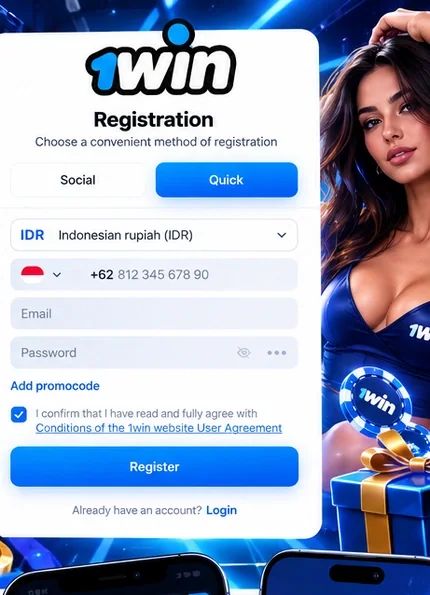
The form offers quick registration and sign-up through a social account. For quick registration you choose your account currency, then enter your phone number, email address and a password. Pick a long password you do not use anywhere else. Think about the currency too: it usually cannot be changed easily later, and choosing the same currency as your bank or wallet avoids conversion fees.
4. Enter the promo code
Tap “Add promocode” in the form and type the code from our promo code page. This is the only moment it can be added – it cannot be attached to the account later. Then tick the box to accept the user agreement and press Register.
5. Confirm your account
Confirm your email with the link 1win sends or your phone number with the SMS code. Then complete your profile with your real name and date of birth, exactly as they appear on your ID.
Social Sign-Up or Email and Phone?
Signing up through a social account is the quickest route: the form takes your basic details from the network you choose, and you log in with one tap later. The downside is that access to your 1win account then depends on that social account – if you lose it, logging in becomes harder. Registering with an email address and a phone number takes a minute longer but gives you two independent ways to recover access. Whichever route you take, the promo code is entered the same way, in the registration form.
Verification
1win checks your identity to confirm your age and that the account is really yours. The check is usually requested before the first withdrawal. Have ready:
- a passport, national ID card or driving licence;
- if asked, proof of address such as a recent utility bill or bank statement;
- clear photos with all four corners visible and no glare.
Uploading the documents right after registration saves waiting when you want your money.
What Happens After You Upload Documents
Once you have uploaded your documents, 1win's team reviews them. If a photo is unclear, a corner is cut off or the details differ from your profile, you will be asked for a new picture or an extra document. How long the check takes varies; it is usually quickest when the photos are sharp and the profile matches the ID exactly. You can follow the status in your account, and live chat can tell you whether anything is missing.
Logging In
To log in, open 1win, press Login and enter your email or phone number and password. The same account works in the browser, in the 1win app on Android and iPhone, and in the Windows app. Your balance, bets and bonuses are the same everywhere.
If you forget your password, use the password recovery link on the login form and follow the email or SMS you receive. Change your password straight away if you think someone else knows it.
Common Problems and Fixes
| Problem | Likely cause | What to do |
|---|---|---|
| No confirmation email | Spam filter or a typo in the address | Check spam and request the email again |
| No SMS code | Wrong country code or network delay | Check the number and wait a few minutes |
| Password not accepted | Typo or Caps Lock | Type it again slowly or reset it |
| Promo code missing | Not entered during sign-up | It cannot be added later; contact support for current offers |
| Withdrawal on hold | Verification not finished or details differ from ID | Upload documents and ask live chat what is missing |
Changed Your Phone Number or Email?
If you no longer have access to the email address or phone number you registered with, do not open a new account – that counts as a duplicate. Contact 1win support instead through live chat, explain the situation and be ready to confirm your identity with your documents. Once access is restored, update your contact details in the profile so password recovery works again.
Keep Your Account Safe
- Only use one account – duplicate accounts can be closed and their bonuses removed.
- Never share your login details, including with anyone who claims to work for 1win.
- Bookmark the 1win page you land on; lookalike sites copy casino logos to steal logins.
- Avoid logging in on public Wi-Fi or shared computers, and always log out afterwards.
After Registration
With your account open, make your first deposit to unlock the first stage of the welcome offer, then head to the casino or the sportsbook. If 1win does not load for you, our troubleshooting page lists the usual causes.
Registration Questions
How long does registration take?
A couple of minutes. Verification is separate and usually needed before the first withdrawal.
Can I register with a phone number?
Yes, with either an email address or a phone number.
Can I add the promo code later?
No, it can only be entered in the registration form.
Which documents do I need?
A passport, ID card or driving licence, and proof of address if requested.
Can I have more than one account?
No. One account per person; duplicates can be closed.
Can I change my account currency later?
Usually not on your own. Choose the currency carefully during registration and ask support if you really need a change.
Can I register through a social network?
Yes, the form offers sign-up through a social account as well as by email or phone.
Last updated: October 2026